WeChat Channels Subtitles: Font Size and Duration
On Channels, a large share of playback happens muted. Viewers judge a video with the sound off, so subtitles carry the main message rather than decorating it. Font size, line count, duration — and how landscape and portrait footage differ — all below, ready to copy.
Muted playback: subtitles are the spine, not garnish
In the feed, Channels stays silent by default. Viewers decide "is this worth watching" in the first two or three seconds, and the opening subtitles decide completion. Treat the subtitle track as the video's second information channel: big enough, clear enough, long enough on screen. Write copy for the silent scene too — key facts belong in the subtitle, not just the voice-over. This is also why subtitle proofreading deserves extra care here: the text does the talking, and viewers notice every error.
Font size and line count
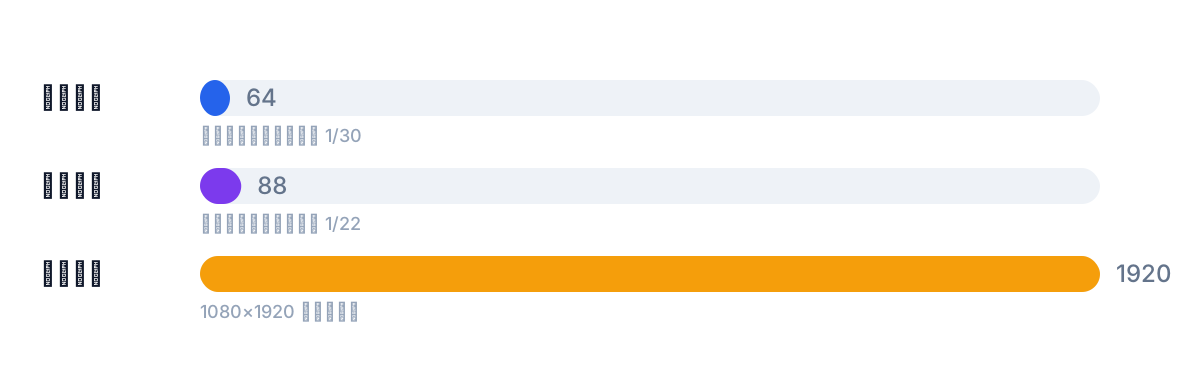
"Font 24" means nothing — what matters is the canvas pixel height. Rule of thumb: one line takes 1/30 to 1/22 of frame height, about 64–88px on 1080×1920 portrait footage.
Three rules to keep: max two lines per cue with the whole block under 1/6 of frame height; for two lines, count both lines in the total height instead of maxing out each; landscape footage renders smaller on phones, so push the ratio up a notch.
Why percentages instead of fixed pixels: subtitle font size by frame-height ratio.
Matching duration to length
Cue duration must match character count, or viewers get cut off mid-read. The site's checker uses the same yardstick:
- Chinese: max 18 characters per line, under 9 chars/second
- Latin scripts: max 42 characters, 2 lines max, under 20 chars/second
- Each cue holds 1–7 seconds
A 4-second Chinese cue stuffed with 50 characters is already over. Split it into sequential cues rather than shrinking the font into illegibility. Channels moves quickly — shorter cues, durations near the lower bound.
Landscape vs portrait
The same account may post both, and they take different handling: portrait has UI stacked on the frame, so subtitles sit upper-middle with the bottom and right side clear; landscape gets letterboxed on phones — no UI overlap, but the same ratio renders smaller, so the ratio goes up a notch.
Run the subtitle checker before export to flag overlong, over-fast and too-brief cues; slide whole-timeline offsets with the shift tool.
Burn in or platform captions
Hard subtitles (burned into the frame) are the safer choice on Channels: muted scrolling, forwards and screenshots all keep the text, and nobody can turn them off. Platform caption tracks toggle, but display depends on the platform and the style is the platform's. For a burned final cut, SmileSub handles recognition, translation and burn-in in one browser pass. The full trade-off: burned-in vs soft subtitles. If the same video also goes to the official account or Moments, one hard-subtitled cut serves everywhere — cheaper reuse.
Common mistakes
Memorizing font size in fixed pixels — it breaks when the canvas changes; use percentages. Stuffing too many characters into one cue — split by reading speed. One parameter set for landscape and portrait — landscape renders smaller, raise the ratio. Relying on platform captions alone — in silent playback, "not enabled" means "not seen".
Quick settings
Try 1/26 of frame height first, preview full-screen on a phone, adjust toward 1/22 or 1/30, then fix it for the whole video — never per cue. The first 3 seconds matter most on Channels, so don't make the opening cue too brief; give viewers a window to decide.
FAQ
What font size works on Channels?
1/30 to 1/22 of frame height per line — about 64–88px on 1080×1920 portrait; a two-line block stays under 1/6 of frame height. Use percentages, not pixels.
How long does one cue stay?
1–7 seconds, tied to character count: Chinese under 9 chars/second and 18 per line, Latin under 20 chars/second and 42 per line. Can't finish reading? Split the cue.
Do landscape and portrait need separate settings?
Yes. Portrait watches for UI overlap and keeps the safe area; landscape renders smaller on phones, so the ratio rises. Don't reuse one set directly.